|
-
June 27th, 2011, 04:38 PM
#8
Re: Newbie here - a few questions..
Ok, I tried to do what BigEd suggested; to disable the caclulate button until the fields had a valid value. I can't say I understood much of what you wrote, BigEd (sorry, but I'm VERY new to this...) but I found this, which looked like a perfect coding for what I was trying to do: http://stackoverflow.com/questions/4...box-is-valid-c
So I tried to use that and wrote this in my project file:
Code:
        private void textBox6_TextChanged(object sender, EventArgs e)
        {
            this.button3.Enabled = !string.IsNullOrEmpty(this.textBox6.Text);
        }
Here's a picture (I have added some new functions): (EDIT: I know, should be "pounds")
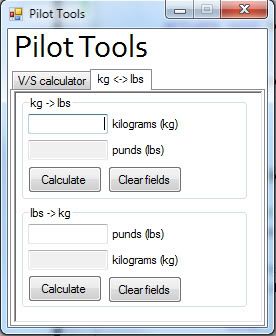
textBox6 = the top text box
button3 = the first calculate button
No errors, but when I start the program the button is still enabled. BUT if I write something and clear it again, either using backspace or the "clear fields" button, it gets disabled. And when I write somtehing again it enables like it should. What can I do to fix this, so the button is disabled from the program startup?
Thanks...
Last edited by Even92LN; June 27th, 2011 at 04:42 PM.
 Posting Permissions
- You may not post new threads
- You may not post replies
- You may not post attachments
- You may not edit your posts
-
Forum Rules
|
Click Here to Expand Forum to Full Width
|


 Reply With Quote

