I am self taught (obviously) and have written several programs, one of them rather large and complicated. That was the first program I ever wrote and it has gone through one entire rewrite already and it's time for version 3, but to do what I want to do for that version I need a little advice.
This program performs many different tasks. It checks if registry keys or registry names exist, compares registry values to variables or other registry values, sets registry values to variable or registry values, iterates through all the subkeys of a registry key looking for a particular registry name and, if found, compares the value there with A and B. If it's A the entire subkey is deleted, if it's B the entire subkey is ignored. It lists processes, compares file names and locations of processes with given variables, kills processes based on comparisons, checks if files exist and possibly renames them if they do, and on and on.
Currently as each detection is made it will prompt what to do about it. What I want to do is make it keep track of each detection and give me a list at the end of the scan. Not too tough, normally. However, the problem comes with the fact that I am doing so many different thing. I may need to delete a registry key, delete a registry value in a key, set a registry value to a specific value, set a registry value to the same as another registry value, remove lines from a file, add lines to a file, kill a process, rename a file, etc. So for each detection I have an unknown number of variables with unknown types and I need a way to keep track of what each group of variables means (i.e., am I deleting a registry key or creating it? Or are we talking about a file? Or a line in a file?). I also need to group similar items together.
So what I need is a way to keep track of all of this information so that, at the end, the user can simply check boxes, hit "Fix" and the program can go through each line and figure out what needs to be done with the variables, preferably independent of the display.
I realize I am being rather vague here. The program is simply too large to explain quickly in much detail. Suffice it to say it is a (currently very functional) malware removal tool. I do not want to share code publicly (don't want the bad guys to know what I'm doing), but have no problem sharing it privately (warning, I'm an amateur, it's a mess) with anyone willing to help me sort out version 3. I also realize I am asking a lot. It's not quite "teach me to code", but it's up there with requests, especially when I start asking follow-up questions. Thank you in advance for any help you can give.
Re: Need a little advice on moving to the next level
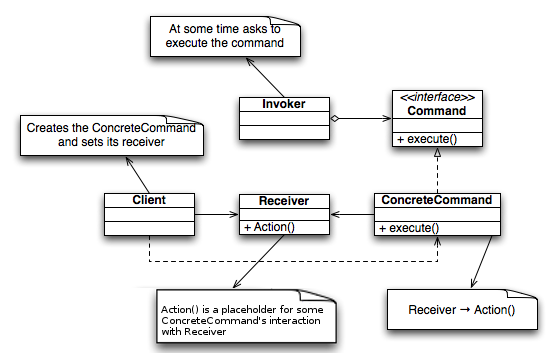
I think you can use the Command pattern here quite nicely (ref 1, 2).
Take a look at the diagram - it might look complicated, but it's not:
To figure our what's this all about, forget the Client, the Receiver, and the Invoker for the moment, and focus on Command-classes.
This pattern provides you with a way to encapsulate an operation in a class - that is, to represent an operation as an object, and then to abstract it away, so that you don't have to worry about the exact details.
The Command is the abstraction; on it's most basic level, it just provides the common public interface for all commands, consisting only of the Execute() method. So, in C#, this should be defined using either an abstract class (maybe you'll want some common/default logic), or better yet, a C# interface (more flexibility).
The ConcreteCommand class then derives from Command and provides the functionality necessary for a specific type of commands it represents. Similarly to methods, a command (being an encapsulation of an operation), will probably (but not always) require additional data to be passed to it - you can do this in the constructor, or by setting properties on it, or calling methods (other than Execute() ).
So, in your case, you could, for example, have an IFixCommand interface, and then various command classes that implement it: DeleteSubkeyCommand, KillProcessCommand, SetRegistyValueCommand...
Encapsulating operations like this has various advantages. For example, it could be used to implement undo/redo functionality.
But, here's the thing that's particularly relevant to your question - having all of these implement the same interface (or derive from the same abstract class), enables you to treat them all in the same way, without actually worrying what is it that each concrete command does. You can store all of these as IFixCommand variables somewhere, and just call Execute() on them later. All the required information to execute them should be already contained in each of the command objects (assuming they were properly created/initialized).
The object that stores a collection of command objects (as IFixCommand-s) in your app would correspond to the Invoker role in the above diagram, as it would also be used to call Execute() on the commands. Note that the Client and the Invoker roles don't have to be separated.
You can also use a collection to help keep track of which commands the user selectes later on, or you can use some other method.
The Receiver class depicted represents an entity that is to be somehow affected by the command. This could really be anything - a command object could be used to show a menu, or to execute a menu command, or to change window layout, or open a web page, or add some records to a database, or play a song, or make a change to the registry, or whatever. Conversely, there will be many potential Receiver objects in your app. Depending on the structure and complexity on your app, a command's execute method might even call some method of the Client, but generally you'll want to reduce coupling as much as possible.
Now, how and where to create the command objects: as you do your analysis, instead of executing the fix operation immediately as you do now, you would create a corresponding command object (as at this point you have all the information you need to do so), and store this object in a collection, for later use. Then you display all the available commands to the user, in some convenient form (you might expand the abstract interface to include a way to obtain the command description as well), keep track of what is selected, and than call Execute() on those. Or you can use some other presentation method - the key is to properly map user selection to the command objects.
Finally, when you design your application, you want to think about granularity: You might create several types of commands that work on the registry, or you might represent them all using a single RegistryCommand class (and maybe derive a class or two from that for some special cases). This is a matter of style, scope, convenience, and the requirements, so you'll have to be the one to decide on this.
Last edited by TheGreatCthulhu; November 7th, 2011 at 08:49 PM.
Re: Need a little advice on moving to the next level
Thank you for your reply. I'm going to have to read it a few times to get exactly what you are saying, but on the surface it looks like exactly what I was looking for.
One thing I should note, I'm not real clear on exactly what a class does or when/why I would use it. Currently I am using only a single class and all it does is define public variables, most of them static (program version, temp directory locations, system directory locations, current directory, etc.) I know I can use classes to, basically, redefine commands to take different types of inputs (put simplistically, the way I understand it) and I have the vague notion that they might be used to store data somehow in a way other than what I cam currently doing. I think I'm going to have to get a firm grasp on classes before I go much further as I think that once I grasp them fully everything you just told me will make perfect sense and the problems I'm having visualizing how to move forward will simply disappear. I think my main problem right now is that classes are such an integral, useful concept that without a firm understanding of them I'm going to be making it a lot more work than it has to be. Would you agree with that assessment? Thanks.
Re: Need a little advice on moving to the next level
By the way, I'm using Visual Studio 2008 Standard and currently targeting the .NET 2.0 framework because most XP computers already have it installed. I am a computer repair technician by trade (about 10 years now), which is why my project is about making virus repairs simpler.
I don't know why I didn't think to give this information in the first post. It certainly seems important to let you know what I'm using and that I'm not just off on some random project because it sounds cool. In fact, all of the detections my program does are taken directly from infected computers that have come into my shop or viruses I purposely infected a virtual desktop with to see what changes they made. So I know what I'm doing on the detection and repair end, not so much on the programming end, in case it matters.
Re: Need a little advice on moving to the next level
Aah, I see.
I don't have time to provide a detailed response right now - but I am planing to show you how to make this work with what you've got now, and to provide you with a brief and hopefully concise introduction to classes - maybe later today, or perhaps tomorrow.
So, yes, classes and objects are very important, fundamental concepts; however to truly understand them and OOP in general will require a lot of reading and re-reading, and will require way to much time before you can get your (modified) app up and running. I'm not saying you shouldn't learn this stuff, but given your situation as you've described it, it's probably better if you learn on the fly.
In the mean time, please answer me a few questions, and maybe do some preparations - i feel I can trust you with that.
I originally thought this was a Windows Forms application, but now it feels more like a console app? Which one is it? And how do you want the user to (in terms of UI - GUI or textual) specify which commands should be executed?
As for preparations: currently, are the operations you perform for each of the fixes extracted each in its own separate method, or are they just instructions done on the fly (maybe within a whole bunch of if-else statements)? If they are not represented as methods, please encapsulate each in a public static method (given your current design, I want to keep it simple, and avoid major refactoring - thus static methods).
You can represent some similar operations with a single method, and vary the behavior of this method based on the input parameters (for example, all registry-related operations, or maybe a group of similar registry-related operations could be made into a single method).
Try to rely mostly on parameters, and not on static member variables, since this might introduce some unwanted interdependency.
Basically, this set of public static methods will represent the capabilities of the underlying system for various type of fixes, and your app and your command objects would be then layered on top of that.
This has various advantages - avoids code repetition (you just call the method on several places, as opposed repeating all the operation code), makes your intent more clear to the reader, makes it easier to debug, etc.
If you feel the code needs this kind of change, and if you're up to it, please do that in the meantime. If it's already organized that way, then great.
Finally, my intention is for the command objects to, when Execute() is invoked, simply call these static methods and pass to them as parameters the data they [command objects] received during construction/initialization.
The main class/program-flow would store each of the objects in a List<IFixCommand> instance, and call some of them later.
As I've said, I'll explain in more detail when I find time (of course, I invite other CodeGuru members with enough experience to jump in and help out with this before that time if possible, provided that whoever embarks on this understands and agrees with my suggestion - remember, my goal is to get this thing up and running as is, provided the OP's current skill level, and the current structure of the application (basically, all static methods, all procedural).)
Last edited by TheGreatCthulhu; November 9th, 2011 at 09:43 AM.
Re: Need a little advice on moving to the next level
Originally Posted by TheGreatCthulhu
Aah, I see.
I don't have time to provide a detailed response right now - but I am planing to show you how to make this work with what you've got now, and to provide you with a brief and hopefully concise introduction to classes - maybe later today, or perhaps tomorrow.
So, yes, classes and objects are very important, fundamental concepts; however to truly understand them and OOP in general will require a lot of reading and re-reading, and will require way to much time before you can get your (modified) app up and running. I'm not saying you shouldn't learn this stuff, but given your situation as you've described it, it's probably better if you learn on the fly.
I do not expect you to hold my hand through any of this. Just point me to what I need to read about and I should be good to go. Of course if you are willing to give me more advice than that I am more than happy to accept, but I do not expect it.
Originally Posted by TheGreatCthulhu
In the mean time, please answer me a few questions, and maybe do some preparations - i feel I can trust you with that.
I originally thought this was a Windows Forms application, but now it feels more like a console app? Which one is it? And how do you want the user to (in terms of UI - GUI or textual) specify which commands should be executed?
It is a Windows Forms app. I'm pretty geeky, but not so much that I have an affinity for command line. I hate console apps.
Basically how I have it laid out is in sections. The first section does the initial startup, splash screen, acceptance of the terms, etc. It then calls the main method. The main method is little more than a list of other method calls. The other methods have intuitive names. Here is an example call:
metDelValNamIfExist("HKCU", @"Software\Policies\Microsoft\Internet Explorer\Control Panel", "HomePage");
You can see the name of the method tells what it does, then I have the registry root, followed by the key, then the value name I am checking for. This particular method calls other methods. There are common methods for ensuring that a registry root and key are valid before opening them, for instance, and a common method for writing to the log file.
What currently happens is it writes data to a textbox and to a log as it scans, but keeps no other records. As a result you must answer Yes or No for each detection as it comes up because only at that point, when I am in the method doing the checking, does the program know if something was detected and what to do about it if it was.
Also, if it makes a detection that method may call still other methods to do still other checking based on what it found. For instance, if it finds that a program named lsass.exe is running from a temp directory it will not only allow you to kill the process, it will then look for the file and allow you to rename it and check common start locations and allow you to remove those. Each of those tasks is another method, most of which call other common methods which are reused everywhere. I have a good start to code reuse, though it could be better.
Originally Posted by TheGreatCthulhu
As for preparations: currently, are the operations you perform for each of the fixes extracted each in its own separate method, or are they just instructions done on the fly (maybe within a whole bunch of if-else statements)? If they are not represented as methods, please encapsulate each in a public static method (given your current design, I want to keep it simple, and avoid major refactoring - thus static methods).
You can represent some similar operations with a single method, and vary the behavior of this method based on the input parameters (for example, all registry-related operations, or maybe a group of similar registry-related operations could be made into a single method).
Try to rely mostly on parameters, and not on static member variables, since this might introduce some unwanted interdependency.
Basically, this set of public static methods will represent the capabilities of the underlying system for various type of fixes, and your app and your command objects would be then layered on top of that.
This was my first real program, but my second rewrite of it. It needs to do so many things that it's kind of jumbled. In some places I have great reused code. In other places I had to write an entire method to perform a single task. Take, for instance, proxy settings in Firefox. None of my other methods could read a file line by line looking for specific text, remove lines, replace lines and add lines. And no other method needs to do that. So there's an entire method with no reusability just for that. Oh, and though I don't know why, it's probably important to mention that all data defining what to detect is passed directly in the method call command as it is in the example above. There's probably a better way which would allow me to make more generic methods, but there's only a vague notion of how to do this like a fine mist floating around in my head.
Originally Posted by TheGreatCthulhu
This has various advantages - avoids code repetition (you just call the method on several places, as opposed repeating all the operation code), makes your intent more clear to the reader, makes it easier to debug, etc.
If you feel the code needs this kind of change, and if you're up to it, please do that in the meantime. If it's already organized that way, then great.
If I am understanding you correctly, the code already has some organization. The plan right now is to do a total rewrite from scratch to avoid the pitfalls I've dug for myself in the current code. There's just no easy way to back out of some of the mistakes I am now good enough to see without doing it right from the beginning.
Originally Posted by TheGreatCthulhu
Finally, my intention is for the command objects to, when Execute() is invoked, simply call these static methods and pass to them as parameters the data they [command objects] received during construction/initialization.
The main class/program-flow would store each of the objects in a List<IFixCommand> instance, and call some of them later.
As I've said, I'll explain in more detail when I find time (of course, I invite other CodeGuru members with enough experience to jump in and help out with this before that time if possible, provided that whoever embarks on this understands and agrees with my suggestion - remember, my goal is to get this thing up and running as is, provided the OP's current skill level, and the current structure of the application (basically, all static methods, all procedural).)
I actually have no interest in rewriting this code at my current skill level. It works just fine the way it is, it just doesn't do it "pretty". There are a few errors to be addressed yet, but nothing too serious. It works as expected most of the time. I want to write above my skill level.
A little history. I LOVE coding. Always have. But when I got out of it for a few years and then tried to get back into it I had one major problem. I understood the concepts on the 1st page, I didn't care about "Hello World", so I skipped to page 57 and I was lost. I just can't get interested in writing console apps to tell me my name. The only reason I have finally become capable of doing what I can do now is because I came up with projects which interest me and which I have a use for. This one, for instance, started out as a simple program to fix registry keys your antivirus missed when removing a virus. Then I had an idea for another feature, and another, and another. Before I knew it my program was detecting viruses and removing them. Although I love this program, it's not the program I really care about. It's BETTER programs I care about. I'm here because I have gotten to a point where I don't know how to get better. I'm not really hear for help with this program. I'm here for help figuring out what I need to know to make the NEXT program, more or less. The more difficult the concept, the more I want to understand it.
Thanks again for all your help. I have been without much time lately as well, but I will be reading and re-reading your posts to glean every gem I can. And my next step is to look up about a thousand explanations for classes until I find fifty or so that sink in.
Re: Need a little advice on moving to the next level
Originally Posted by Asmodee
I do not expect you to hold my hand through any of this. Just point me to what I need to read about and I should be good to go. Of course if you are willing to give me more advice than that I am more than happy to accept, but I do not expect it.
Of course - however, considering you're not familiar even with classes there is a lot fundamental OO concepts you must first learn, before you form even a vague idea of how it all applies to the command pattern described above.
Originally Posted by Asmodee
If I am understanding you correctly, the code already has some organization. The plan right now is to do a total rewrite from scratch to avoid the pitfalls I've dug for myself in the current code. There's just no easy way to back out of some of the mistakes I am now good enough to see without doing it right from the beginning.
OK. What I said about static methods before: I interpreted your previous post to mean that your functionality is already implemented via static methods. They are not required (or encouraged to be used in that way), I just wanted to avoid a major refactoring if this was indeed the case.
The main problem code design tries to solve is making your code change-ready. Classes and design patterns enable you to structure your code in such a way so that it is easier to maintain, possible to make changes to one part of the system with minimal impact on other parts, easier to reuse existing code and add new features.
Originally Posted by Asmodee
I actually have no interest in rewriting this code at my current skill level. It works just fine the way it is, it just doesn't do it "pretty". There are a few errors to be addressed yet, but nothing too serious. It works as expected most of the time. I want to write above my skill level.
[...]
Although I love this program, it's not the program I really care about. It's BETTER programs I care about. I'm here because I have gotten to a point where I don't know how to get better.
The reason you have trouble adding the functionality you want to your current program is that you didn't have enough knowledge/skill to structure it in such a way that it is relatively easy to add new features in the future - you've reached a point where it has become too unwieldy.
That's what you need to start learning now - that's what classes are for.
Learning OO will help you both make this program better, and it will also help you write better programs in the future.
So, here goes a crash course... And some example code afterwards.
A Crash Course in Classes
Classes, at their most basic level, essentially provide you with a way to group some data together with some methods related to that data. (There are some other language mechanisms involved, but I'll get to that later.)
That is just a different way of saying that classes enable you to define your own, custom data types. Classes describe types.
In C#, you have types like int, float, double, string, DateTime, Form, Button, Label, Timer... These are all defined as classes (yes, some of them are structs, but under the hood, a struct is just a special kind of class). So, you've been using pre-made classes all along.
So you already know a few things about them - they have members (internal data, public properties, public methods), and these members can be accessed via the "." operator (conveniently called member access operator).
For example, someLabel.Text = "test" accesses the Text property of the Label class on this particular Label object (more on objects soon).
However, these are just the technical aspect. What's more important is what classes are conceptually, in terms of application design.
Classes are used to model concepts. By "model", I mean that someone designes a class as a certain suitable often simplified representation of some concept, a representation tailor-made to help solve certain kind of problems. By "concepts", I mean things your application has something to do with, things it works with, things that are part of the apps logical model.
These things can come from real world experience and real business requirements: a videogame needs classes to represent people, cars, terrain, vegetation, monsters; a business app might use classes to represent things like stores, sales, orders, products, customers, customer accounts; a scientific app could use classes to represent atoms, molecules, reactions, substances, experiments, cross-references...
These things can also be concepts unrelated to any real business or everyday activities, but things completely abstract, or specifically devised to help better structure the application, or to support some algorithm. Take classes that represent hashtables, linked lists, object managers, a facade to a subsystem, presentation logic, various contextual information.
Now, a class, as I said, defines a type. That simply means it defines what are the objects of that type, what data they contain (internal data) and what they can do (methods) for whoever uses the class.
So, in a sense, a class is a blueprint, a recipe the compiler can use to construct an object of that type, with all the characteristics defined by that class.
For example, the string type (alias for the String class), is a blueprint for strings (string objects), which in turn provide all he functionality defined in the String class - like concatenation, trimming, conversion to all caps, extraction/deletion of a substring, etc...
The important point here is that normally, your app will not work with classes ("blueprints"), but with objects, a.k.a. instances of your classes. Each class instance (objects) maintains its own independent set of internal data (internal state). Member methods are invoked on objects, not classes, and if they make some changes to the state, these changes pertain only to some particular object.
(Analogy: you can't drive a blueprint (class) of a car, but many cars (car instances) may be produced from this blueprint; then you can proceed to use some specific car (specific instance) by performing certain operations (fill the tank, start the engine, add gas, break; all cars can do this, but you can only execute these operations on a car at a time) - these are analogous to methods.)
Finally, classes are a way to reduce complexity and provide better reusability and maintainability. Each class has a specific role in an application, and the main philosophy behind classes is that they are self-contained units, a mini-system of sorts that "knows" how to (or, is capable to) do something for us. How exactly it does what it does should almost entirely be a matter of its internal implementation, and thus should not be of any concern to other parts of the overall system. The system just needs to know what a class does, so it can decide how it can use it.
This way, any potential problem that could arise would be isolated to some particular class, and not hidden somewhere in the whole system, hard to pinpoint behind a web of interdependencies no one can keep track of.
The other benefit is that more complex systems can be built by combining several smaller units, and other systems can be layered on top of all that.
Now, let's skip ahead a bit: a crash course on class composition and inheritance.
As you know, classes all contain some methods, and some data. This internal data can be of any type - int, float, double, string... Note that I said "of any type", and as classes define new types, you can use these new types here as well.
We usually say that class A contains class B. However, note that it's more accurate to say that class A defines a member field (member variable) of type B, and thus any object of class A will contain a variable that points to an object of class B.
Again, objects can contain other objects, and classes are blueprints for objects. But we usually keep it simple, and just say class A contains B - it is important to know what that actually means.
So, that's basically composition in a broad sense, and you've used it extensively: your form class contains objects of other UI classes - buttons, labels, menus, text boxes, radio buttons... These all collaborate in various ways to create a working windows form.
Composition is the preferred way to provide variety and flexibility in your application. It is preferred over inheritance - because inheritance is often misused. However, inheritance is an extremely important tool, and is very useful when used properly. I'll briefly cover it next.
Inheritance allows you to define an "is-a" relationship between classes. This is the same kind of relationship that exist, for example, in biological classification. Wolfie "is-a" dog, and every dog "is-a" mammal, and every mammal "is-a" vertebrate, and every vertebrate "is-an" animal, and every animal "is-a" living being. See how there are several types in there? And how they all form a hierarchy? Wolfie is some specific dog, dog is a concept that describes a domestic mammal that can bark, wig tail, or whatever; then, a mammal is an animal that has hair, likes to drink milk as a baby, and stuff like that.
Notice three things: (1) some concepts are more abstract than the others - "animal" is more abstract and general than "dog"; (2) each of the more specialized terms expands upon the previous abstraction - a dog is everything a mammal is, and everything that goes for a mammal, goes for the dog too. but not the other way around, because the concept of "dog" expands upon "mammal", adding some unique traits not all mammals share; and (3), the "is-a" relationship is transitive - you can say hat Wolfie "is-a" dog, but also that Wolfie "is-a" mammal, or that Wolfie "is-a" living being, or that every dog "is-a" vertebrate.
You have also used inheritance without even realizing it: your Form1 class is derived from the ("is-a") Form class provided by the .NET framework. The Form class provides basic form functionality (UI drawing, reaction to user input, stuff like minimize/maximize/close behavior), and you form class inherits all of this behavior, and just expands upon it by adding data and methods specific to your application.
Form here would be the base class, or the parent class; Form1 is called the derived class, or the subclass.
Now, here's the neat thing about it. The framework (that runs your app) doesn't really know anything about your application. So, how can it run it? All it knows that your Form1 inherits the Form class, and thus has all the public methods and properties (and internals) the Form class has. The framework does know how to work with this generalized Form class though. So, since Form1 "is-a" Form, the framework can treat it as such, as Form, and call the methods its familiar with. So the app gets up and running, the main window is shown, events/messages flow trough the system, and the generalized process is established. After that, the framework is not concerned with the details of your app - that's the job of the Form1 class. It will receive, for example, input notification through the interface inherited from Form, and then Form1 is free to decide what to do with it, without he framework being involved.
You see, the "is-a" property allows the derived class to be used wherever the base is expected (because derived "is-a" base, and thus has and is capable of everything that the base has/is, and more). So the framework simply expects a Form, but actually gets a Form1, and remains oblivious to that fact. The Form1 does everything that Form does, and the framework relies on that; Form1 however, does all those things slightly differently - because you coded it to do so. And thus, your app gets to run.
This kind behavior is what is required for the Command pattern.
The IFixCommand interface I mentioned before would act as a base class, although it defines no functionality - it's only purpose here is to define a generalized public interface for all commands, consisting onlu of the Execute() method. Then you would have several XYZCommand objects derived from IFixCOmmand, created at the right time, when all the required info about the command was available, and stored for later use. Then, your app would just call Execute() through the IFixCommand interface, oblivious of how Execute() is actually implemented in each of the command objects. Your code would jest expect Execute() to do what the name says it does - it executes some operation. Somewhere at that point, the derived class is notified of the requests, and customized behavior takes over: the commands looks for the contextual data it stored internally, and calls for some fix-related method passing that data to it. The method gets executed, and your program is then free to move onto the next command.
And how this works for base classes (as opposed to interfaces)?
Inheritance allows you to override (redefine) some of the inheritance methods and/or properties. Not all of them (in C#), but only those designated as eligible to be overridden.
These are either methods marked as abstract (no implementation at all in the base class - only the signature is defined), or virtual (provide default implementation in the base class, but can be overridden if required). You override a method by typing "override", and the IDE will present you with a list of members that can be overridden. (But even without the IDE, you mark them with override, and type in the same method/property name and signature that was used in the base class.)
So, when you call an abstract or a virtual method via a base-class reference, the derived version is called (if it exists), depending on the actual type of the object in question.
Interface members don't need to be marked as abstract, since it's not allowed for interface method definitions to have any implementation. Interfaces serve as a kind of a contract - if a class implements an interface, then it surely has implemented all the members defined in that interface.
That would be the most important stuff. Read up on classes, objects, composition and inheritance.
Examples
Now, finally, we come to the point - this might seem like a lot of stuff to soak in, but a few code examples will help a lot. In reality, all of this is not extremely difficult to implement, but there are a lot of OO concepts you need to be aware of, and you don't even know what classes are, and thus such a long intro.
I've created two sample projects to help you along.
The first one [InheritanceExample] is a really basic console application to show you how classes and inheritance work - so that you can see how it all fits together in the other project, and how it'll fit in yours.
The other project [CommandPattern] if a windows forms application that showcases the Command Pattern.
It's a simple app that allows you to click some buttons, which causes some lines or images to be drawn in the display area, or it might clear the screen. After you're done, you can click a button that repeats the whole sequence, or just a selected subset of the commands involved (this was done on purpose, to give you a hint how the Command Pattern will be used for your own app, regarding the requirement that the user can select which fixes should be applied).
(Examples.zip attached. Didn't know what version of VS you use, so both projects are VS2008, .NET 2.0)
So there, study the code thoroughly; I've written some helpful comments where I deemed necessary.
Also, do you know how to use the debugger - namely, step through the code line by line in debug mode.
If not, just set a breakpoint somewhere (where you know it'll get hit), and then use F10 to go line by line, or F11 to go line by line and step into a method if one is reached.
Last edited by TheGreatCthulhu; November 12th, 2011 at 07:53 AM.
* The Best Reasons to Target Windows 8
Learn some of the best reasons why you should seriously consider bringing your Android mobile development expertise to bear on the Windows 8 platform.


 Reply With Quote


 Originally Posted by TheGreatCthulhu


