Re: A better way to write / read dozens of textboxes?
I'm on my first VC project so followed this thread with avid interest.
What I would appreciate is one or more pointers to info on how to achieve what has been hinted at here, namely encapsulating controls in a class.
Originally Posted by Eri523
Finally, the most elegant and efficient approach would probably be, like already suggested by D_Drmmr, to create your own class to bundle the controls for each channel. I'd probably do that myself in the form of an EQ band control class, derived from Panel or even GroupBox. That would be some additional effort up-front but is likely to pay later by simplifying things.
I know how to access controls from a class but that's not the same thing as encapsulating (or "wrapping") is it.
"Add component class" (project menu) looked promising with designer code section in .h but no meaningfull designer view and I can't find any help on what this is or how to use it. Tried to search this forum but... (it still seems to be working on my first search...)
RD
Last edited by RogerD; October 18th, 2012 at 06:22 AM.
Re: A better way to write / read dozens of textboxes?
Originally Posted by Eri523
[about C-style casts] I personally do use them, but rather rarely, and then mostly in the context of calls to native API functions. And the reason why I try to avoid them is not a "codiquette" one; it's because (at least to me) it's somewhat obscure what they actually do in C++[/CLI]: Depending on context, they sometimes behave like a static_cast and sometimes like a reinterpret_cast, and probably there are some more variants that don't come to mind now.
You probably know my position from before: if a simple cast is the goal, I don't see what's the big deal; if some byte-gymnastics needs to be done, that is, if there's some reason to use specific function-style cast, then go for it. I just don't see the point in the idea that code containing C-style casts should be turned down, or that the students should be sanctioned for using them - and I've seen such comments on the forums.
Originally Posted by Eri523
Congrats to 1k posts, BTW!
Wow, didn't even notice .
Originally Posted by RogerD
I'm on my first VC project so followed this thread with avid interest.
What I would appreciate is one or more pointers to info on how to achieve what has been hinted at here, namely encapsulating controls in a class.
I know how to access controls from a class but that's not the same thing as encapsulating (or "wrapping") is it.
"Add component class" (project menu) looked promising with designer code section in .h but no meaningfull designer view and I can't find any help on what this is or how to use it. Tried to search this forum but... (it still seems to be working on my first search...)
RD
Well, the idea itself is not very complicated. Without encapsulation into a specialized control, what really happens is: the existing container controls, like panels, group boxes, or even forms themselves, are designed to accept other controls, so you can simply throw a bunch of labels, buttons, textboxes, or more complicated, composite controls, to create various UIs. But, if you have a lot of them, this method quickly becomes too much to handle.
Now, encapsulation may sound scary, but it an important OO principle which simply means that the internal workings of a class should be invisible to the outside world (the code that uses the class), so that they [internal workings (a.k.a. implementation)] can later be changed (say, improved), if required, without affecting the client code (the code that uses the class). For example, even if you have a bunch of controls on your form, none of them are available to another, different form you might have in your application - because each form should deal only with it's own set of controls.
To encapsulate a bunch of controls into something like an equalizer control, basically means to create a new control class, that will have it's own internal subcontrols, and that will then serve as a sort of a prefab custom composite control you can just drag onto your form just like you would do with a button or a combo box. If you need more than one, no problem - just drag another one. So, it's a neat thing. It handles the complexity by localizing certain responsibilities into certain places. The form handles button clicks, showing and hiding, communication, and such, but its the custom equalizer control that handles equalizer-specific behavior. The parent form has pretty much nothing to do with it.
But, there must be a way for the form and the custom control to communicate, without violating each others' privacy. This is done through well designed public methods (a.k.a. the public interface). This way, each class essentially says to the outside code "OK, these are the things I support and can do", and also, this enables each class to perform safety checks, handle invalid input, and similar. It is the public interface that enables the internals to change without affecting existing code - as long as a class does what it says it does, it doesn't matter how it does it (from the program correctness point of view - of course, it's better if the new way shows better performance).
OK. Now that we went over the basics, this is what you would do. You would create a Windows Forms Control Library project, and then you would be presented with a visual designer, where you would design your custom control. Just like when you create a new form, your custom control would be a class derived from an existing .NET class, in this case, the class in question is UserControl, which is really nothing more than an empty panel. Then, in the designer, you would drag a bunch of other readily available controls onto that panel, and arrange them in a certain way. Just like with a form, you would then add click handlers for buttons and/or other events, and do some work in them.
Then you would think about how this control should be used, and what information should be exposed to the outside world (and possibly received) from it. Based on this, you would create a public interface by adding some methods and properties. For example, for an equalizer control, you would provide a function (or a set of functions) for getting the values of each bar - so that the parent form can pass them on to the sound system. But anything equalizer specific (graph representation, color change effects as the bars are moved, presets, etc.) would be handled internally by the equalizer user control class, and wouldn't be available to the form. (Note that there's no form at this point, these are all simply considerations related to the fact that the user control will ultimately end up on a form.)
Once design and implementation are done, you would then create a windows forms application, as usual. You would then add a project reference to the user control library you just made, just like you would add a reference to any other .NET library. Now, I don't know the details in C++/CLI, but your user control should then appear on the toolbox, and you would simply drag it onto the form. If not, then you would be able to create it directly in code.
Re: A better way to write / read dozens of textboxes?
Originally Posted by TheGreatCthulhu
[Re 1k posts]
Wow, didn't even notice .
Just like the last post count milestone I congratulated you to: #600 on July 10th last year (for history freaks: documented in our profile visitor message exchange - actually, I had to look it up there myself). Interestingly, even your choice of words was exactly the same back then...
[...] You would create a Windows Forms Control Library project, and then you would be presented with a visual designer, where you would design your custom control. [...]
Oh, how I'd love to do that, but unfortunately there's no such project type for C++/CLI, at least not in the Express Edition. I also experimented with the "Add component class" menu item already mentioned by RD and various other stuff, all to no avail...
[...] If not, then you would be able to create it directly in code.
And that's exactly what I have always done in this situation. I have created a little demo project with a really simple hand-coded aggregate control, to somewhat approximate the EQ band scenario. (Admittedly, one of the reasons for me to write it was that I [correctly, as I do know now] anticipated having fun doing it... ) And now that you've laid out the fundamentals, perhaps it's even more instructive. (I hope I haven't violated the design recommendations you proposed correctly too much... )
This is what the demo looks like (of course the traffic light is the handcrafted control):
// TrafficLight.h
// Demo control class header file

#pragma once

namespace TrafficLightDemo
{
using namespace System;
using namespace System::Windows::Forms;

[Flags]
public enum class TrafficLightState
{
  Dark = 0x00, Red = 0x01, Yellow = 0x02, Green = 0x04,
  RedYellow = Red | Yellow, GreenYellow = Green | Yellow
};

public ref class TrafficLight : public Panel
{
public:
  TrafficLight();

  void AdvanceCycle();

protected:
  virtual array<TrafficLightState> ^GetCycleArray();

private:
  PictureBox ^CreateLightPbx(String ^strFileName, int nTop);
  void LightPbxClickHandler(Object ^sender, EventArgs ^e);

public:
  property TrafficLightState State
  {
    TrafficLightState get();
    void set(TrafficLightState value);
  }

protected:
  // Entirely trivial property override implemented right here for brevity:

  virtual property Drawing::Size DefaultSize
  {
    Drawing::Size get() override
    {
      return Drawing::Size(47, 119);
    }
  }

private:
  PictureBox ^m_pbxRed;
  PictureBox ^m_pbxYellow;
  PictureBox ^m_pbxGreen;
  TrafficLightState m_state;
  array<TrafficLightState> ^m_atlsCycleArray;
  int m_nCycleIndex;
};

}
Code:
// TrafficLight.cpp
// Demo control class implementation file

#include "StdAfx.h"

#include "TrafficLight.h"

using namespace TrafficLightDemo;

using namespace System::Drawing;
using namespace System::IO;

TrafficLight::TrafficLight()
{
  // With relative file names like this, the program expects the image files in the current
  // working directory. This is the project directory (the one with the source files) when
  // it is started inside the VS IDE with default project settings.

  // The bitmap images used in this demo are based on
  // http://en.wikipedia.org/wiki/File:Traffic_light.gif

  BackgroundImage = Image::FromFile("TrafficLightDark.png");
  m_pbxRed = CreateLightPbx("LightRed.png", 7);
  m_pbxYellow = CreateLightPbx("LightYellow.png", 43);
  m_pbxGreen = CreateLightPbx("LightGreen.png", 79);
  m_atlsCycleArray = GetCycleArray();
}

PictureBox ^TrafficLight::CreateLightPbx(String ^strFileName, int nTop)
{
  PictureBox ^pbx = gcnew PictureBox;
  pbx->Image = Image::FromFile(strFileName);
  pbx->Name = Path::GetFileNameWithoutExtension(strFileName);
  pbx->SizeMode = PictureBoxSizeMode::AutoSize;
  pbx->Location = Point(0, nTop);
  pbx->Visible = false;
  Controls->Add(pbx);
  pbx->Click += gcnew EventHandler(this, &TrafficLight::LightPbxClickHandler);
  return pbx;
}

TrafficLightState TrafficLight::State::get()
{
  return m_state;
}

void TrafficLight::State::set(TrafficLightState value)
{
  m_state = value;
  m_pbxRed->Visible = value.HasFlag(TrafficLightState::Red);
  m_pbxYellow->Visible = value.HasFlag(TrafficLightState::Yellow);
  m_pbxGreen->Visible = value.HasFlag(TrafficLightState::Green);
}

void TrafficLight::LightPbxClickHandler(Object ^sender, EventArgs ^e)
{
  // Forward picture box clicks to the TrafficLight (i.e. myself)
  // because visible picture boxes are mouse-opaque:

  OnClick(e);
}

// This implementation returns a traffic light cycle as used in Germany.
// The function is declared protected virtual, so derived classes can
// override it to change the cycle.

array<TrafficLightState> ^TrafficLight::GetCycleArray()
{
  return gcnew array<TrafficLightState>{
      TrafficLightState::Green, TrafficLightState::Yellow,
      TrafficLightState::Red, TrafficLightState::RedYellow
    };
}

void TrafficLight::AdvanceCycle()
{
  m_nCycleIndex = (m_nCycleIndex + 1) % m_atlsCycleArray->Length;
  State = m_atlsCycleArray[m_nCycleIndex];
}
And here's the main form implementation file of the demo, making use of the control above:
I intentionally decided to leave the code mostly uncommented, because I think finding out what it can do by studying the code rather than documentaion is more instructive with respect to how it does this. All the functions are somewhere between small and tiny, so it shouldn't be too hard to understand. Most of the remaining complexity is most probably due to the inherent complexity of the subject.
Admittedly, there's also some "hidden complexity" due to cascading control interactions. I mainly think this just demonstrates how implementing stuff in terms of other stuff can surprisingly simplify things. Admittedly (again) such a design incurs some risk of trouble like infinite event recursion or counter-productive circular control state dependencies, but then again, nothing good comes for free...
I also attached a ZIP file of the demo project to this post.
Last edited by Eri523; October 27th, 2012 at 10:31 PM.
I was thrown out of college for cheating on the metaphysics exam; I looked into the soul of the boy sitting next to me.
This is a snakeskin jacket! And for me it's a symbol of my individuality, and my belief... in personal freedom.
Re: A better way to write / read dozens of textboxes?
Originally Posted by Eri523
Oh, how I'd love to do that, but unfortunately there's no such project type for C++/CLI, at least not in the Express Edition. I also experimented with the "Add component class" menu item already mentioned by RD and various other stuff, all to no avail...
Oh. Right, that's a bit of a problem. In any case, your sample is a nice, understandable, compact demonstration of the concept that nicely complements all I said above. The fact that your custom control derives from Panel makes no difference, to clarify that for RogerD. For the same reason, I'd like to make a few comments, in order to connect your code to what I said in the previous post.
[hr]
@RogerD: About Public Interface vs Internal implementation using Eri523's Example Code
Internal implementation details mostly come down to the implementation of the State property (here, only the declaration is shown).
The State property itself represents a part of the public interface (along with everything else declared public).
The important thing to note here is that, while the TrafficLight control itself contains 3 picture boxes, none of them is ever exposed to any code outside the class. What TrafficLight class does with those 3 picture boxes is a matter of internal affairs, to put it that way.
Note that the form only passes a TrafficLightState value, and only gets that value back, and the TrafficLight control updates its internal state (which picture box is shown, and at what time), without the form "knowing" anything about it, as you can see here.
From the perspective of the form, it just works. This is good for two reasons. First, if a piece of code from the outside ever got a reference to one if the internal picture boxes, nothing could prevent that code to, say, set a smiley face image instead of a red light image. This violates the invariants of the TrafficLight class (which are in this context, roughly: only show the correct light, and nothing else). Second, once a public interface is established, the internals can change smoothly (maybe a better way of implementing is suddenly available, the control might be made more performant, etc.). For example, all those picture boxes can be entirely removed from the code, and the TrafficLight class can be modified to simply draw the traffic light image(s) onto its own surface - and no change would be required to the Form1 class, which is an example of the code that uses the TrafficLight class. All client code remains functional - the change is localized to the TrafficLight class.
One thing to note is that the events of the TrafficLight control (inherited from Panel) are also a part of the public interface.
So, the following peace of code is an example of how TrafficLight can communicate via an event that it has been clicked - the client code (Form1) class subscribes to an event, passing a callback method (which TrafficLight will then be able to call, in order to notify Form1):
Code:
EventHandler ^ehTrafficLightClick = gcnew EventHandler(this, &Form1::TrafficLightClickHandler);

// and then later...

trl->Click += ehTrafficLightClick; // the hook-up
Then Form1 implements what should happen on this notification (coordinates the behavior of controls on a higher level):
Code:
void Form1::TrafficLightClickHandler(Object ^sender, EventArgs ^e)
{
  cbxLight->Text = safe_cast<TrafficLight ^>(sender)->Name;  // updates the "Traffic light" combo box to the selected traffic light
}
So, the controls communicate (form to each of the TrafficLight-s and vice versa) through a well established public interface (a kind of a protocol, if you will), and never manipulate any private state other than their own.
Last edited by TheGreatCthulhu; October 18th, 2012 at 08:55 PM.
Re: A better way to write / read dozens of textboxes?
That's an impressive response from TheGreatCthulhu and ERI523and sure to be very helpful to many other users. Maybe should have started a new thread!
Obviously the material here is going to take some digesting as there's a few features new to me but here a couple of silly questions for starters:
In TrafficLight.h what's the [Flags] there for? Seems to make no difference if I take it out but changing it to say [FlagsZ] throws C2337 which isn't a listed error. Is it important?
The demo project works as a stand-alone but the most obvious problem is that it doesn't appear to create a component (visible in designer)making it difficult to design UI. In fernando306's project for example it's necessary to leave a large blank area in designer for all the instantiated panels to be plugged in at run-time. Or am I missing a step?
Looking again at "Component Class" it certainly appears made-for-the-part with overloaded constructor ("for designer support"). I guess the reference to IContainer gives the class container properties without the neccessity of inheriting from an actual container (i.e, panel.) Maybe in the non-express versions this works in the way we want it to. I'm shooting in the dark here - hopefully managing to miss my foot! When I have learned a lot more than I know now maybe I will be able to make more informed guesses...
Thanks again,
RogerD
Re: A better way to write / read dozens of textboxes?
Originally Posted by RogerD
[...] Maybe should have started a new thread!
I actually considered that, then decided against it because I thought it's still related. May have been a wrong decision, but I hope at least it's not blatantly wrong...
In TrafficLight.h what's the [Flags] there for? Seems to make no difference if I take it out but changing it to say [FlagsZ] throws C2337 which isn't a listed error. Is it important?
Actually, in the given demo project as posted/uploaded, the FlagsAttribute probably does not have any observable effect at all. At least it serves as an indication that TrafficLightState is a bit flags enum, and it may have an important effect when the code is changed later. The attribute mostly (if not exclusively) influences how the [Try]Parse() and ToString() methods behave for the enum it is applied to. The MSDN documentation on the attribute is interesting and instructive, but it rather describes some bit flags best practices than what the attribute actually does.
What do you mean by "C2337 isn't a listed error"? These Cxxxx error and Wxxxx warning numbers are great to simply copy-paste them into the search field at the top left of any MSDN page and hitting Return. The documentation on the error usually is the first search hit, or at least among the top three.
The demo project works as a stand-alone but the most obvious problem is that it doesn't appear to create a component (visible in designer)making it difficult to design UI. In fernando306's project for example it's necessary to leave a large blank area in designer for all the instantiated panels to be plugged in at run-time. Or am I missing a step? [...]
No, I don't think you're missing anything. That's simply the way how to use this sort of roll-your-own controls (unless I'm missing something myself... ). I have gotten used to it over time. Here's a real-life example:
The 7-segment digit in the Options dialog is a hand-coded control. Unlike TrafficLight it's not an aggregate control; it's derived from PictureBox (not entirely sure why actually, the class is in a stable state since quite some time now, could probably have derived it from Panel as well) and otherwise is entirely owner-drawn, except for the solid-colored background which is drawn by the base class. Using it together with Designer-created controls like here demands some sense of proportion, manual calculations and/or plain trial & error. I can perfectly live with that, however.
The actual stopwatch on the main form, OTOH, is an aggregate control, derived from Panel and comprising eight 7-segment digit controls, three 7-segment punctation controls (hand-written), four labels (plain System::Windows::Forms::Label) and two almost invisible indicators at the right end which basically are labels as well. All the other controls on that form are children of another (auto-sized) panel and have been placed there using Forms Designer. That panel is invisible to the user (actually, rather, its Visible property is true but it's not noticeable) and serves the sole programmatic purpose to group the controls to simplify size calculations and setting their positions. The actual size of the form and position of the panel are calculated and set up at runtime in the form's constructor. That's basically the other way to deal with this sort of hand-written controls.
Looking again at "Component Class" it certainly appears made-for-the-part with overloaded constructor ("for designer support"). I guess the reference to IContainer gives the class container properties without the neccessity of inheriting from an actual container (i.e, panel.) Maybe in the non-express versions this works in the way we want it to. I'm shooting in the dark here - hopefully managing to miss my foot! When I have learned a lot more than I know now maybe I will be able to make more informed guesses...
I have experimented with that too, but with zero actual success. IContainer and the related interfaces definitely seem to have something to do with that, but I'm still uncertain about their concrete roles. I find the IContainer MSDN sample rather unintuitive and uninstructive: If I'd be writing book list code, I would create my book class as needed and place instances of it in one of the generic collections or a database, instead of making use of these interfaces that apparently are originally meant for something completely different. I'd really appreciate a more practical example. And if you'd find out anything interesting in that direction, of course I'd appreciate that too. Perhaps the actual answer is rather simple and I was just too dumb to see it right in front of my eyes.
I have, however, also experimented with some technique to "hijack" an existing Designer-created control at runtime and replace it with my hand-coded one. That way one can reserve space on the form for the custom control at design time by creating a placeholder control. But that only ever is about intuitive if the placeholder control is rather similar to the custom one, ideally of its base class. I haven't touched the code for that since more than a year, but it's still experimental and rather hackish. That's because I never really took the effort to develop this to real practical usability, since I've been perfectly happy with the techniques described above. We could discuss that technique, but I'd probably need to tidy up the code to be presentable, and that would definitely deserve a new thread.
Last edited by Eri523; October 23rd, 2012 at 06:37 PM.
I was thrown out of college for cheating on the metaphysics exam; I looked into the soul of the boy sitting next to me.
This is a snakeskin jacket! And for me it's a symbol of my individuality, and my belief... in personal freedom.
Re: A better way to write / read dozens of textboxes?
Finally got a couple of hours to myself to look at this.
Originally Posted by Eri523
What do you mean by "C2337 isn't a listed error"? These Cxxxx error and Wxxxx warning numbers are great to simply copy-paste them into the search field at the top left of any MSDN page and hitting Return. The documentation on the error usually is the first search hit, or at least among the top three.
That's what happens relying on local help my internet access is limited to one dongle and my wife...
Originally Posted by Eri523
I have experimented with that too, but with zero actual success. IContainer and the related interfaces definitely seem to have something to do with that, but I'm still uncertain about their concrete roles. I find the IContainer MSDN sample rather unintuitive and uninstructive: If I'd be writing book list code, I would create my book class as needed and place instances of it in one of the generic collections or a database, instead of making use of these interfaces that apparently are originally meant for something completely different. I'd really appreciate a more practical example. And if you'd find out anything interesting in that direction, of course I'd appreciate that too. Perhaps the actual answer is rather simple and I was just too dumb to see it right in front of my eyes.
I have had a brief look at Component class again with a little success. Create a class and drag components onto the "designer" - I put a single button on - and modified the .h slightly including inheriting from "Panel":
Code:
namespace TrafficLightDemo {

	/// <summary>
	/// Summary for Fred
	/// </summary>
	public ref class Fred : public System::Windows::Forms::Panel //System::ComponentModel::Component
	{
	public:
		Fred(void)
		{
			InitializeComponent();
			//
			//TODO: Add the constructor code here
			//
			this->Controls->Add(button1);
		}
You still have to hand enter properties like Location but it's definitely easier than entering the whole thing (or perhaps lifting from a prototype.) It also allows events to be coded "automatically" so it does reduce the typing quite a bit. In this simple test the IContainer constructor doesn't appear to do anything - is that related to changing the inheritance from Component to Panel?
Originally Posted by Eri523
I have, however, also experimented with some technique to "hijack" an existing Designer-created control at runtime and replace it with my hand-coded one. That way one can reserve space on the form for the custom control at design time by creating a placeholder control. But that only ever is about intuitive if the placeholder control is rather similar to the custom one, ideally of its base class. I haven't touched the code for that since more than a year, but it's still experimental and rather hackish. That's because I never really took the effort to develop this to real practical usability, since I've been perfectly happy with the techniques described above. We could discuss that technique, but I'd probably need to tidy up the code to be presentable, and that would definitely deserve a new thread.
Would it be an idea to create a module on a dummy form complete with events and just lift the designer code into the class constructor? Would it not be easier to use a panel of the same dimensions as a placeholder or am I (grossly) over-simplifying?
Re: A better way to write / read dozens of textboxes?
The demo project works as a stand-alone but the most obvious problem is that it doesn't appear to create a component (visible in designer)making it difficult to design UI. In fernando306's project for example it's necessary to leave a large blank area in designer for all the instantiated panels to be plugged in at run-time. Or am I missing a step?
Just a question - I can't find a machine with the Express version of VS at the moment, but, do you mean that the custom control doesn't appear in the toolbox (so you have nowhere to drag it from), or that you can drag it onto the designer work area, but it doesn't "behave" properly (can't manipulate it the normal way)?
If it's the toolbox, maybe you can add it manually - if that option is available in Express (could be that you tried this already...): In Form Design View, rgt-click on an item or an empty area -> Choose items... -> Browse to the .NET DLL (compile first).
The Choose Toolbox Items dialog is apparently a bit funky, as it might refuse to appear if, say, a firewall prevents internet access (at least in my experience).
Last edited by TheGreatCthulhu; October 30th, 2012 at 09:02 PM.
Re: A better way to write / read dozens of textboxes?
Oh right - the second option. The designer page is just like a normal form designer only without the form. Dragged components appear as an icon like the non-visual components e.g., timer and file dialog. Just click the icon to enter properties/events like in normal designer. Still have to manually enter
" this->Controls->Add(button1);" though (see prev post.) I think this is the visual component designer neutered for Express vs.
Thanks for advice tho - unfortunately there's nothing in rt-clk tho only an "arrange icons" etc seton b/g or a standard cut/copy/paste menu on the icon itself.
Looks like I might have to consider getting out the plastic...!
Re: A better way to write / read dozens of textboxes?
IIRC this is about as far I got with that myself, and then I asked myself what would be the real advantage of that over hand-coded aggregate controls...
I was thrown out of college for cheating on the metaphysics exam; I looked into the soul of the boy sitting next to me.
This is a snakeskin jacket! And for me it's a symbol of my individuality, and my belief... in personal freedom.
Re: A better way to write / read dozens of textboxes?
Before I go on to what I wanted to say in this post, another question: when you derive from Panel, what functionality does VS Express provide, in terms of visual design capabilities? Does it allow the customized panel to be dragged onto a Form on the design surface, does the panel appear normally, and is the panel's member variable created?
OK.
I only now see what's the confusion here (I think - frankly, I got a little lost in all the posts here).
So, let me first see if I got this right: you are experimenting with composite control programming (by this I mean a control that logically and visually contains other controls), and you are implementing IContainer, or deriving from Container in order to do this?
The problem is, Microsoft's naming of the classes is a little confusing here. The IContainer interface and it's ready-made implementation, the Container class, don't represent a composite control. The concept of "container" here represents a logical container (host) of components, where components are IComponent implementations, which, as you know, may or may not be controls, or may or may not have a visual representation (think timer components, DB-related components, etc...).
The idea behind components is that they, although not necessarily visual in nature, can be combined, modified, and reused in a way similar to the way controls are used for visual UI design (don't forget that controls are specializations of the Component class). Containers in this context are objects that contain (host) components, coordinate them and provide various services (like serialization, code generation, designer support, etc.). For example, the Windows Forms designer itself is a container that host design time versions of the controls, and other components.
Now, the .NET library also provides a base class for composite controls, called ContainerControl, and a corresponding interface, IContainerControl. ContainerControl derives indirectly from Control (so it inherits all the common functionality), and directly from ScrollableControl, so there's support for that. On its part, it adds some very basic composite control related functionality - namely, you can add child controls and set which one of them has focus.
This class is a base class for some other controls you often use, like Form, SplitContainer, ToolStripPanel, and more importantly in the context of this discussion, UserControl.
UserControl is the class you want to derive from if you want to make custom composite controls. The class itself is fully functional, but when not specialized, it's really nothing more than an empty panel, with an important difference.
While the Panel class is designed as a design-time drag & drop area, onto which controls can be added directly in the designer of the form, UserControl is not. UserControl itself can be designed, but in a separate designer window, where you can add child controls and fine tune the appearance of your customized composite control (this is what enables you to avoid adding buttons, labels, and other child controls manually in code). However, once compiled, when you go back to the form's design view, you can drop your user control onto the form, but the user control will not, by default, accept additional child controls through a drag & drop operation - and this is good; you're making a ready made product, you don't want any client code (or developer) to mess with your visual design.
This, at least in non-Express versions, makes the user control appear as any other control.
This also means that, once placed on the form, only one member variable will be added to the form's code - the member variable representing your user control. Variables representing subcontrols are not, and should not be added to the form's code, since the subcontrols are owned and manipulated by the user control itself (encapsulation). They are the responsibility of the user control. If you want client code to affect the internal state of the user control, you have to provide a public interface (methods/properties/events) through which this can happen. This way, the state-change logic remains encapsulated inside the user control.
If you want your user control to behave more like panel, see this. But usually, you don't - because what you're making is a well defined, reusable product, with a consistent appearance across different uses.
Note that Panel is not derived from ContainerControl - I suspect this decision has to do something with the way Panel is used at design time. When you drag & drop child controls onto the panel, it's the form that owns those child controls, and it's the form that manages their life time. Sure, panel propagates various events to them, but that's the extent of its responsibility. It's as if you're an electrical engineer, and your having fun with making circuits, adding AND and OR gates to the board to achieve certain functionality.
With UserControl is different: it's as if you made a product, closed it in a case (encapsulation), and the case provides input and output slots (interface) through which the product can be plugged into some machine designed to use it (client code / form), and you are ready to ship it.
Normally, users don't open the case and mess with the internal components.
So, try out deriving from UserControl, or even ContainerControl, and post back if the design-time experience is any different.
Re: A better way to write / read dozens of textboxes?
Originally Posted by TheGreatCthulhu
Before I go on to what I wanted to say in this post, another question: when you derive from Panel, what functionality does VS Express provide, in terms of visual design capabilities? Does it allow the customized panel to be dragged onto a Form on the design surface, does the panel appear normally, and is the panel's member variable created?
No, none whatsover. In fact the only full designer support is for forms and the only built-in classes AFAICT are Forms, Component class mentioned before and very basic (non CLR) C++ class. As mentioned in a previous post Component class has limited designer support and all components dropped simply appear as icon (like e.g. timer.)
I'm new to VisualC and /CLR so probably Eri523 will be able to give more detailed answer.
This is an example of Component class with one button added:
Code:
#pragma once

using namespace System;
using namespace System::ComponentModel;
using namespace System::Collections;
using namespace System::Diagnostics;


namespace EncapsTest {

   /// <summary>
   /// Summary for EQcontrol
   /// </summary>
   public ref class EQcontrol :  public System::ComponentModel::Component
   {
   public:
      EQcontrol(void)
      {
         InitializeComponent();
         //
         //TODO: Add the constructor code here
         //
      }
      EQcontrol(System::ComponentModel::IContainer ^container)
      {
         /// <summary>
         /// Required for Windows.Forms Class Composition Designer support
         /// </summary>

         container->Add(this);
         InitializeComponent();
      }

   protected:
      /// <summary>
      /// Clean up any resources being used.
      /// </summary>
      ~EQcontrol()
      {
         if (components)
         {
            delete components;
         }
      }
   private: System::Windows::Forms::Button^  button1;
   protected:

   private:
      /// <summary>
      /// Required designer variable.
      /// </summary>
      System::ComponentModel::Container ^components;

#pragma region Windows Form Designer generated code
      /// <summary>
      /// Required method for Designer support - do not modify
      /// the contents of this method with the code editor.
      /// </summary>
      void InitializeComponent(void)
      {
         this->button1 = (gcnew System::Windows::Forms::Button());
         //
         // button1
         //
         this->button1->Location = System::Drawing::Point(0, 0);
         this->button1->Name = L"button1";
         this->button1->Size = System::Drawing::Size(75, 23);
         this->button1->TabIndex = 0;
         this->button1->Text = L"button1";
         this->button1->UseVisualStyleBackColor = true;

      }
#pragma endregion
   };
}
hope this helps to make it clearer. NB: This is a purely experimental project inspired by ERI523's excellent example and is a "self learning exercise" (in encapsulation) for me so I don't want to be too specific here. The object at present is to create a composite class which encapsulates several controls (on a e.g. panel). The class is then instantiated several times (60 I think in the original project) to make up the complete control panel. Making re-usable controls I think is probably not possible in Express?
Eri523
IIRC this is about as far I got with that myself, and then I asked myself what would be the real advantage of that over hand-coded aggregate controls...
Well I just created my own demo (using some of what I learned in this thread) and I definitely found this method to be easier than trying to tweak the components to fit the space by hand. I created a class and set it to derive from Panel. Then I added a form and put a panel onto it and assembled all the components and added the event handlers using the deisgner. Then I just lifted the designer code into the waiting class and removed the bits for the form designer and edited the panel name to the class name. Everything works fine (so far...) To make changes to the design I just copy the body of the designer code rather than the whole class.
You can probably see I am trying two approaches wrt passing changes back to Form1. The methods in Form1 are accessed from the individual class instances using the "this" and FaderID parameters passed in the constructor (this makes identifying the caller instances efficient.) The second method is to set the event handlers (callbacks?) to call Form1 directly but this means the controls have to be declared public. At present I am looking at using delegates to implement the callback. Would appreciate any comments as to which, if any, of these is the best with respect to best OO and encapsulation policies.
RD
Re: A better way to write / read dozens of textboxes?
OK, I downloaded Visual C++ 2010 Express so that I could see for myself, but I actually managed to use the designer normally; the question is, does this functionality somehow come from what I had previously installed, or is VS Express actually capable of doing this on it's own (and it appears to me that it should be). So I'm going to attach a VS 2010 Express project, so that you can try
Originally Posted by RogerD
As mentioned in a previous post Component class has limited designer support and all components dropped simply appear as icon (like e.g. timer.) Capture1.PNG
And as I mentioned in my previous post, since the Container class and the Component class do not represent a UI control, this behavior is normal. All UI Controls derive from the Control class, which is a specialization of Component, so, all Controls are Components, but not vice versa.
The icon like appearance for the non-control components is expected.
EDIT: I just noticed that deriving from Panel results in the same component like behavior, because Panel is not "designable". But I have a hunch this default behavior can be changed. Just a sec.
EDIT1: I dunno, have to read up the docs a bit more - but there's probably a way to make a Panel-derived class appear as a designable control by applying some attributes, like DesignerAttribute and possibly DesignerCathegoryAttribute.
To exploit the capabilities of the control designer, you should derive from System::Windows::Forms::UserControl.
I'm going to both attach the project, and write the steps so that you can reproduce it independently.
Here goes (assuming there are only the 4 project types available when VC++ Express installs) - create a solution with two projects:
First create a simple Windows Form project, to be used as a test host window for the user control.
This way, the win form app will be set as the startup project by default. Note: you might want the name the solution differently, to match the name of the dll project (the other project that will actually contain the code for the user control).
New project > CLR > Windows Forms Application
Now create the class library (DLL) project:
New project > CLR > Class Library > (make sure that "Add to solution" is selected from the dropdown, and not "Create new solution") > OK
Now add a Windows Form class to that project [the class library project].
This is for convenience, and it'll be a form only temporarily - so give this class a name intended for the user control ("MyControl", "EQControl"...).
Close the design view for that class, and open the code view.
Replace public ref class MyUserControl : public System::Windows::Forms::Form
with public ref class MyUserControl : public System::Windows::Forms::UserControl
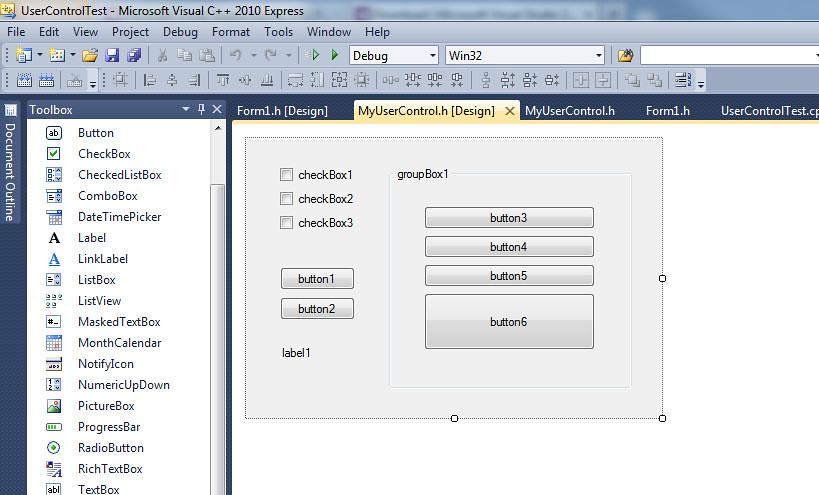
Build solution, then open the design view for the user control. A blank design surface should appear.
Drag a bunch of controls on it from the toolbar. Build the project.
Open the design view for the windows form test host (from the first project).
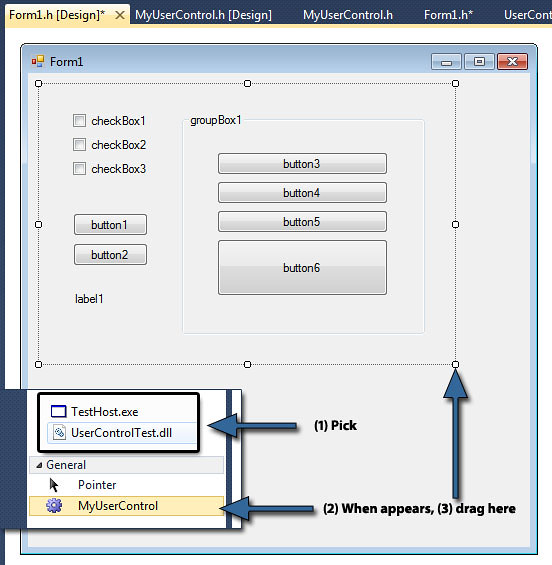
Right-click on the toolbox, and pick "Choose items...". Wait for the Choose Toolbox Items show some mercy and finally appear, then browse to the compiled DLL for the user control.
(Now, this one might be problematic, since I recall you told me you don't have that option - but it appears in my installation of VC++2010 Express )
Pick the DLL file and then press OK to close the Choose Toolbox Items dialog.
The new toolbox item will appear under some category in the toolbox, depending on where you right-clicked.
Now you should be able to drag the user control from the toolbox onto the test form, and the user control should render properly.
Please let me know if this works out.
Here's the attachment: UserControlTest.rar
Last edited by TheGreatCthulhu; November 8th, 2012 at 08:50 PM.
Re: A better way to write / read dozens of textboxes?
Originally Posted by RogerD
I'm new to VisualC and /CLR so probably Eri523 will be able to give more detailed answer.
I'm afraid I don't, at least not at the moment. As I stated some posts above, this is about as far as I got with that myself, then ceased further research in that direction since I doubted the potential benefit. However, it looks like you proceeded beyond the point at which I gave up, so you may know some things I don't...
hope this helps to make it clearer. [...]
Admittedly no, at least not to me and now. The second snippet from your post contains some method definitions that somewhat look like event handlers but don't have their usual signature. I can't really firmly put that into any context known to me. Your complete demo project probably would clarify some things, but I don't have seen a link to download it. Did I overlook something?
@TheGreatCthulhu: Your proposals look really promising and I'll try them out ASAP. Unfortunately I'm rather busy with one of my real-life apps currently, right now pursuing some nastily weird bug that keeps escaping from m grip. (Well, once I'll have caught it, it likely may turn out to actually have been rather simple, and I'll ask myself how that could take me several days; like so many times... )
IIRC in my earlier experiments I got up to item #6 in your post but then got stuck there because my custom control attempt simply didn't show up in the Choose Toolbox Items list. But perhaps that simply was because I chose the wrong base class - in case that matters, what it seems to do.
Mainly, this post is meant to give you both a brief ping back, since I'm rather busy at the time and didn't have much time for this issue. But if we eventually get that sorted out, this may become the best thread ever, at least from my subjective POV. However, it's already way cool right now...
I was thrown out of college for cheating on the metaphysics exam; I looked into the soul of the boy sitting next to me.
This is a snakeskin jacket! And for me it's a symbol of my individuality, and my belief... in personal freedom.
Re: A better way to write / read dozens of textboxes?
I just discovered something awesome: VC++ 2010 Express appears to support another feature of the non-express versions of VS, it's just not turned on by default!
Tools menu > Options...
In the Options window, pick the Windows Forms Designer node from the list on the left, then, at the bottom (Toolbox category), set the AutoToolboxPopulate option to True.
Now you can proceed as described in my previous post, steps 1 through 6, minus the manual toolbox setup part.
With the option turned on, once you create a UserControl-derived class and build it, it will automatically be added by the IDE to the toolbox, at the very top, under it's own category.
* The Best Reasons to Target Windows 8
Learn some of the best reasons why you should seriously consider bringing your Android mobile development expertise to bear on the Windows 8 platform.


Originally Posted by Eri523

)


 Reply With Quote


 .
.
 Just like the last post count milestone I congratulated you to: #600 on July 10th last year (for history freaks: documented in our profile visitor message exchange - actually, I had to look it up there myself). Interestingly, even your choice of words was exactly the same back then...


 my internet access is limited to one dongle and my wife...
 )
)
 However, it looks like you proceeded beyond the point at which I gave up, so you may know some things I don't...
 )
)
